
代码智能(Code Intelligence), 听上去似乎和自动代码生成或者 AI 有关, 但其实 GitLab 上的代码智能指的是 Web 页面中的代码导航功能, 用于在 Web 界面上反查类型签名或者跳转函数定义。
本文目录
从 LSIF 到 SCIP
根据 GitLab 的文档, 代码智能内这个功能置于 GitLab, 使用的是 LSIF(语言服务器索引格式) 格式的预计算数据, 即一个预先为项目生成好的 LSIF 文件, 整个项目只需要读取一个这样的文件就能让 GitLab 实现:
- 代码导肮
- 查找引用
- 查看类型签名与参数说明
- 跨文件、跨仓库的语义关联
然而现行的索引格式其实是由 Sourcegraph 主导并开源的结构化格式: SCIP 协议 索引格式(不是这个 SCIP 规划求解器), GitLab 虽不能直接使用 SCIP 格式, 但 GitLab 可以读取转换成 LSIF 格式后的 SCIP 索引。
Sourcegraph 在这篇博客中聊到了为何长期在精确代码导航中使用 LSIF, 而又为什么要演进到 SCIP。主要就四个原因:
- LSIF 缺乏静态类型支持
- 大量使用难以阅读的数字 ID 来编码图结构
- 在读写 LSIF 图编码时性能低下
- LSIF 在实现增量索引上复杂性过高
因此, 能够解决以上问题的 SCIP 便被其称为下一代索引格式。那么该如何实际部署该功能呢?
使用 Sourcegraph 集成?
在 GitLab 中启用代码导航最便捷的方式, 就是直接集成 Sourcegraph 实例, 可见 GitLab 文档 Sourcegraph。
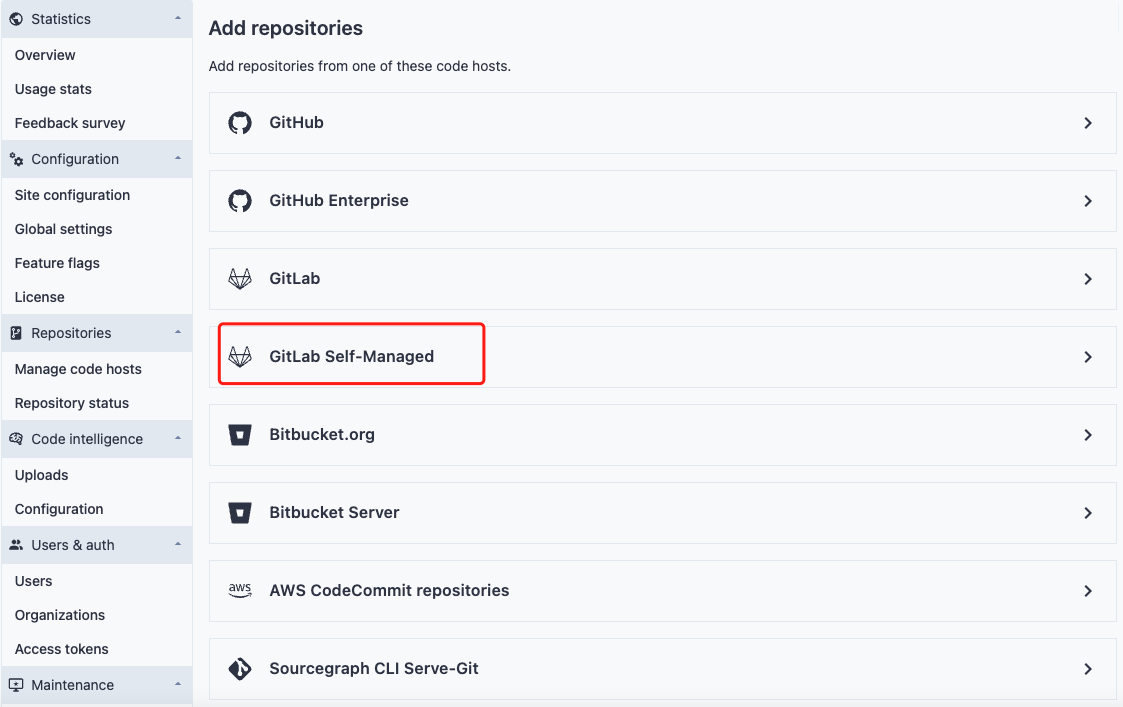
通过在 Sourcegraph 中配置 GitLab 作为代码宿主, 并打通权限, 开发者可在合并请求(MR)、提交视图和文件视图中直接使用 Sourcegraph 的代码分析功能, 在 GitLab 界面内进行高速、跨仓库的代码搜索、跳转定义、查找引用等操作。
不过 Sourcegraph 社区版(Community Edition)虽可免费部署, 但有着10个免费账户的严格限制。用户超过此限制必须购买 Standard 或 Enterprise 订阅。相比之下, GitLab CI 驱动的代码智能则完全基于实例扩展, 通过 CI Runner 便可随项目数量与开发者规模线性扩容, 彻底解除授权瓶颈。况且独立部署 Sourcegraph 意味着需要向容器栈中引入 Sourcegraph 容器, 需要手动同步 GitLab 的用户组权限或配置 OAuth/JWT 映射, 这无疑提升了配置复杂度。此外, Sourcegraph 本身也无内置增量索引调度, 通常需依赖外部 Cron Job 或 CI Runner 手动触发索引生成。这倒不如使用 GitLab CI 将索引生成直接并入代码提交流水线, 以复用现有 Runner 资源与镜像缓存, 一次性地避免独立服务的运维负担、存储隔离问题与版本升级摩擦。
GitLab 的官方实现方案: CI/CD 组件
在 GitLab 的文档中, CI/CD 组件(components)被描述为”可重用的单个流水线配置单元”, 组件可以用来搭建大管道的某个部分, 也可以作为完整的流水线配置, 通常亦以一个项目的形式存在。而存储这些组件的项目就叫做 CI/CD 目录(catalog)或者 CI/CD 组件库。GitLab 官方提供的几种 SCIP 实现, 便是以 CI/CD 组件的形式呈现, 以此利用 GitLab CI 来实现零权限摩擦, CI/CD 原生闭环且成本可控的代码导航方案。
官方文档 Code Intelligence 中有两节提到了如何启用代码智能: With the CI/CD component(使用 CI/CD 组件)和 Add CI/CD jobs for code intelligence(添加 CI/CD 作业来实现代码智能)。文档看上去是递进的, 读完后一般会认为: 需要先在项目流水线中引用 CI/CD 组件, 再手动更改 .gitlab-ci.yml 来添加作业。但其实并非如此, 只要二选一地调整流水线——即仅使用组件便可实现代码导航, 并不一定需要在流水线中逐一手动添加 SCIP 生成和 LSIF 转换任务, 因为使用 CI/CD 组件就是 GitLab 推荐的现代 CI 实践。当 GitLab CI 在项目中的 .gitlab-ci.yml 中发现这句 - component: .../typescript-code-intel 时, 它便会在解析阶段自动将官方项目中的 code_navigation 作业插入到已有的流水线中。文档中的手动作业配置方式, 其实是给那些不使用组件或者需要深度定制索引逻辑(比如修改下载源、执行特殊转换逻辑)的用户准备的参考模板。
不过, 文档里仍有一处需注意的问题:
include:
  - component: ${CI_SERVER_FQDN}/components/code-intelligence/golang-code-intel@v0.0.3
    inputs:
      golang_version: ${GO_VERSION}
Code language: YAML (yaml)
, 该示例中的 ${CI_SERVER_FQDN}/components/code-intelligence/golang-code-intel 并不能正确找到 code-intelligence 组件, 因为该组件仅允许那些托管在 Gitlab.com 上的项目直接访问, 自建的 GitLab 实例不能直接引用官方组件库。因此如果自建 GitLab 实例, 就必须自建私有组件库。不过这并不麻烦, 只需要将 GitLab 官方的 code-intelligence components 项目镜像(Mirror)为一个本地仓库就可以。
直接镜像官方组件库?
为行文便利, 以下将以群组名称 components, 项目名称 code-intelligence 和 GitLab 实例地址 https://gitalb.example.com 为例展开叙述。
为将 GitLab 官方的 code-intelligence components 项目镜像(Mirror)到本地仓库, 我们需按照以下步骤将组件库拉取到自建的 GitLab 实例中, 以便各项目中的 .gitlab-ci.yml 能找到这些组件:
- 在自建的 GitLab 上创建一个名为
components的Group(群组), 并在components群组下创建一个名为code-intelligence的Project(项目) - 确保
components群组和code-intelligence项目的可见性至少为Internal(内部)。如果可见性设置得过于严格, 业务项目中的流水线可能会因权限不足导致组件加载失败。 - 在该项目的镜像仓库 (
Mirroring repositories) 设置里选择添加镜像仓库, 源地址(Git repository URL)填入:https://gitlab.com/components/code-intelligence.git - (关键, 但可能无法完成设置) 将镜像方式(
Mirror direction)设置为Pull, 它表示从远端仓库拉取代码到本地 - 由于
gitlab.com/components/code-intelligence是一个公开仓库, 因此Authentication这一栏无需填写认证信息, 保持默认(None)即可 - 点击保存, 代码便自动克隆到本地了, 且会随着官方的组件项目更新而自动更新
这无论是看上去还是做起来都很简单, 但第二个需要关注的问题也浮出水面: 非付费订阅的社区版 GitLab 用户无法更改镜像方式(付费订阅用户请无视该问题, 请略过后文直接使用 Mirroring repositories 功能即可):
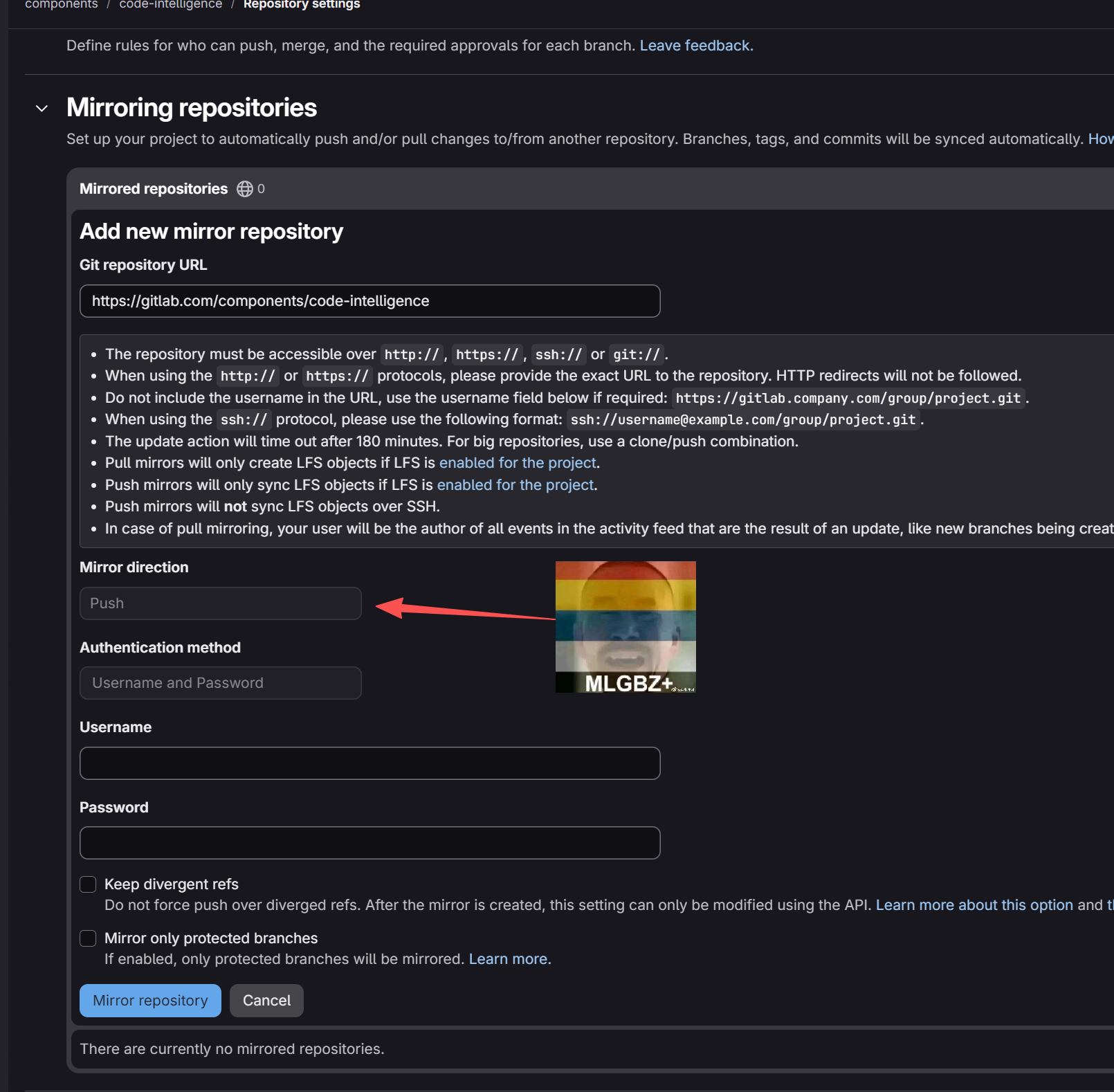
镜像方式的下拉选择框是不可选状态, 这是为什么呢? 因为这是个付费功能:
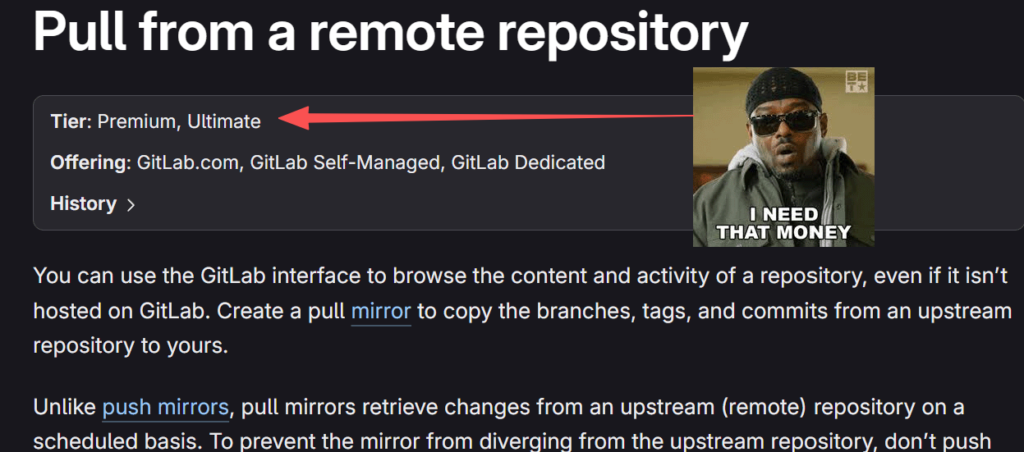
我不开心, 付费墙, 恶心心。但此时也并非万策尽——这一阻碍不过是废掉了一个镜像远端仓库的原生功能, 容易想到, 用 Gitlab CI/CD 定时任务同样能实现这一效果。
不妨用 Gitlab CI/CD 来镜像官方组件库!
在前面的步骤中, 已经创建了一个名为 components 的 Group(群组), 并在 components 群组下创建了一个名为 code-intelligence 的 Project(项目)。那么很自然地想到, 如果用 CI 任务拉取完整的 code-intelligence components 项目并推送到 components 下的 code-intelligence, 然后将其设置为定时任务, 那不就可以自动镜像了官方项目了吗? 确实:
#.gitlab-ci.yml
mirror_code_intelligence:
  image: alpine:latest
  stage: deploy
  before_script:
    - apk add --no-cache git bash
  script:
    - git clone --mirror $SOURCE_URL ./mirror-repo
    - cd ./mirror-repo
    - git remote set-url --push origin "https://gitlab-ci-token:${CI_JOB_TOKEN}@${CI_SERVER_FQDN}/${CI_PROJECT_PATH}.git"
    - git push --mirror origin
  rules:
    - if: '$CI_PIPELINE_SOURCE == "schedule"'
Code language: YAML (yaml)
这个 .gitlab-ci.yml 定义了一个叫做 mirror_code_intelligence 的任务, 在执行脚本前安装 git, 并将 CI 变量 $SOURCE_URL 处的代码克隆到本地目录 mirror-repo, 再以 gitlab-ci-token 权限将克隆下来的代码推送到 components 下的 code-intelligence 仓库。这条流水线使用了 GitLab CI 内置的 $CI_JOB_TOKEN, 每次执行流水线时, GitLab 都会自动注入 $CI_JOB_TOKEN。它默认拥有当前项目的 write_repository 权限, 且每次流水线结束后自动轮换, 无需手动管理, 颇为便利。而 git push --mirror 的作用是完全覆盖目标仓库的所有分支和标签。在 Git 看来, 这等同于对每个已存在的引用执行 git push --force。
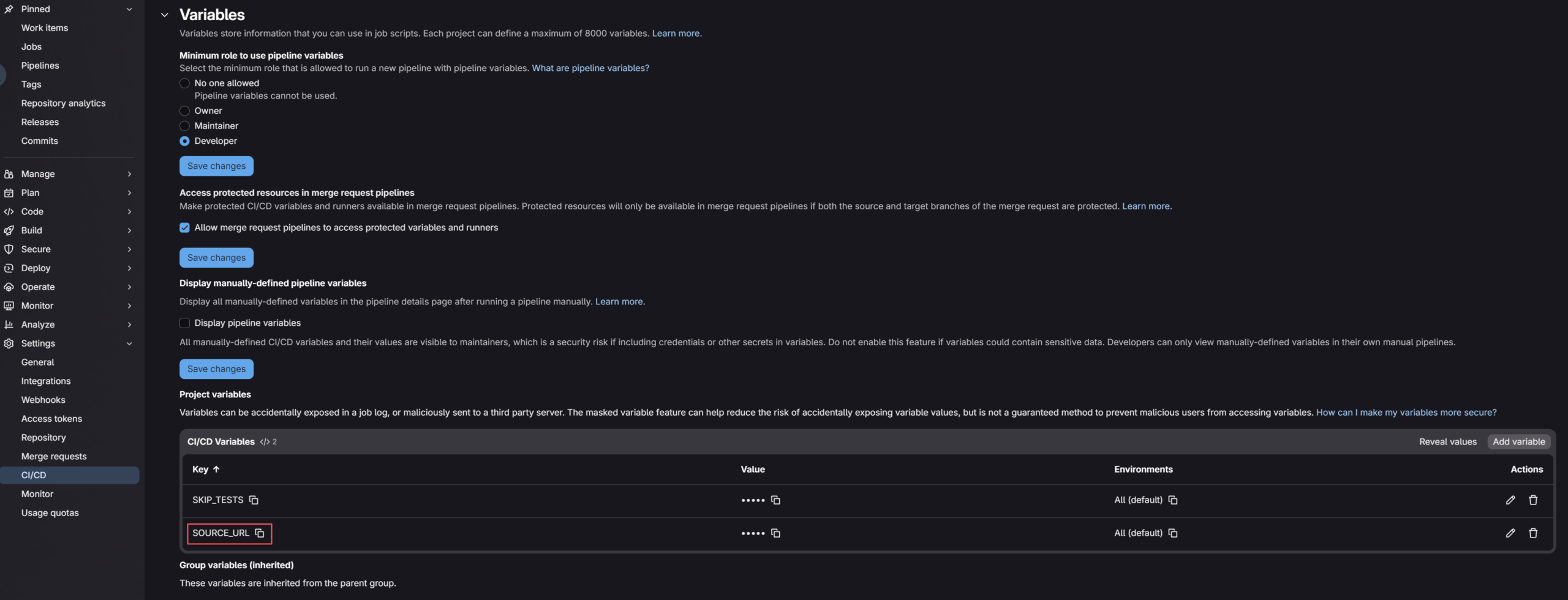
此外, 还需要在 Settings > CI/CD > Variables 中添加 SOURCE_URL 变量, 将其值置为 https://gitlab.com/components/code-intelligence.git 即可, 否则无法在 git clone --mirror $SOURCE_URL ./mirror-repo 这行正确展开变量 $SOURCE_URL。
然而当实际执行该流水线后, 会发现流水线失败并吐出这样的日志:
remote: GitLab: You are not allowed to force push code to a protected branch on this project.
To https://gitlab.example.com/components/code-intelligence.git
 ! [remote rejected] main -> main (pre-receive hook declined)
 ! [remote rejected] phikai-scip-python -> phikai-scip-python (pre-receive hook declined)
 ! [remote rejected] v0.0.1 -> v0.0.1 (pre-receive hook declined)
 ! [remote rejected] v0.0.2 -> v0.0.2 (pre-receive hook declined)
 ! [remote rejected] v0.0.3 -> v0.0.3 (pre-receive hook declined)
 ! [remote rejected] v0.1.0 -> v0.1.0 (pre-receive hook declined)
 ! [remote rejected] v0.1.1 -> v0.1.1 (pre-receive hook declined)
 ! [remote rejected] v0.1.2 -> v0.1.2 (pre-receive hook declined)
 ! [remote rejected] v0.2.0 -> v0.2.0 (pre-receive hook declined)
 ! [remote rejected] v0.3.0 -> v0.3.0 (pre-receive hook declined)
 ! [remote rejected] v0.4.0 -> v0.4.0 (pre-receive hook declined)
error: failed to push some refs to 'https://gitlab.example.com/components/code-intelligence.git'
Cleaning up project directory and file based variables
ERROR: Job failed: exit code 1
Code language: Bash (bash)
这是因为 GitLab 出于安全考虑,默认对 main 分支和相关标签启用了推送保护, 禁止强制推送, 以防止 CI 脚本或误操作覆盖提交历史, 日志中的 pre-receive hook declined 正是 GitLab 保护钩子触发的拦截; 而日志中 v0.0.1 ~ v0.4.0 也被拒绝, 说明同时触发了标签保护。因此需要改动一些项目设置:
放行 main 分支的强制推送和标签更改
- 进入目标项目:
components/code-intelligence - 点击左侧菜单
Settings>Repository - 展开
Protected branches区域 - 找到
main分支,点击右侧的Edit - 勾选
Allowed to force push - 点击
Save changes
这时执行流水线的 CI Runner 便能强制推送代码到 main 分支了:
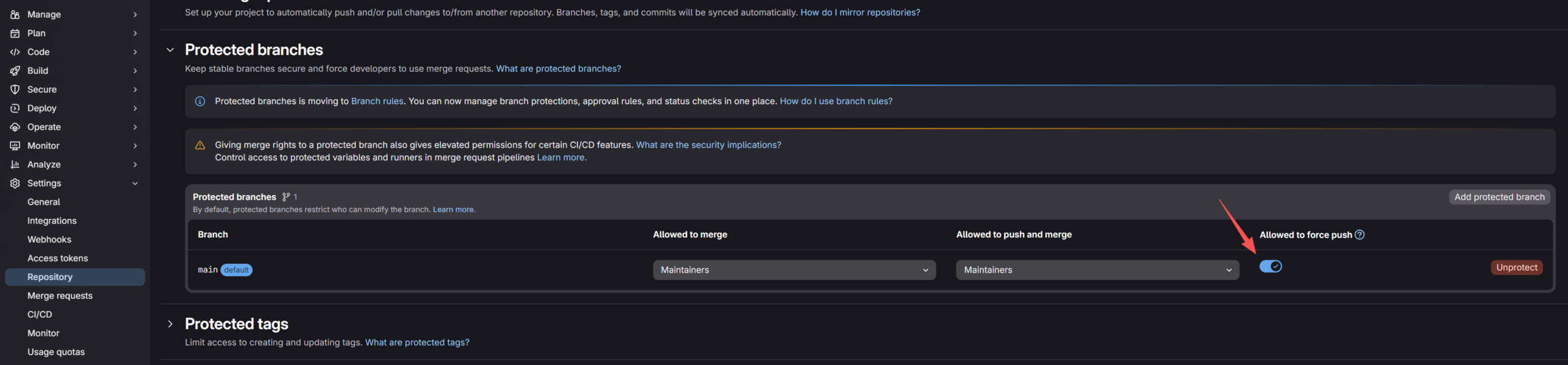
先不要急着切回项目主页, 还需要放行 git push 对标签的更改。在同一页面:
- 展开
Protected tags区域 - 添加一个以正则表达式
v*为内容的tag规则 - 确保
Allowed to create一列包含Maintainers, 因为 CI 默认以Maintainer身份工作
这时执行流水线的 CI Runner 便能将官方项目中版本标签同步到本地仓库了:

最后来到 Settings > CI/CD > Job token permissoions 中启用 Allow Git push requests to the repository:
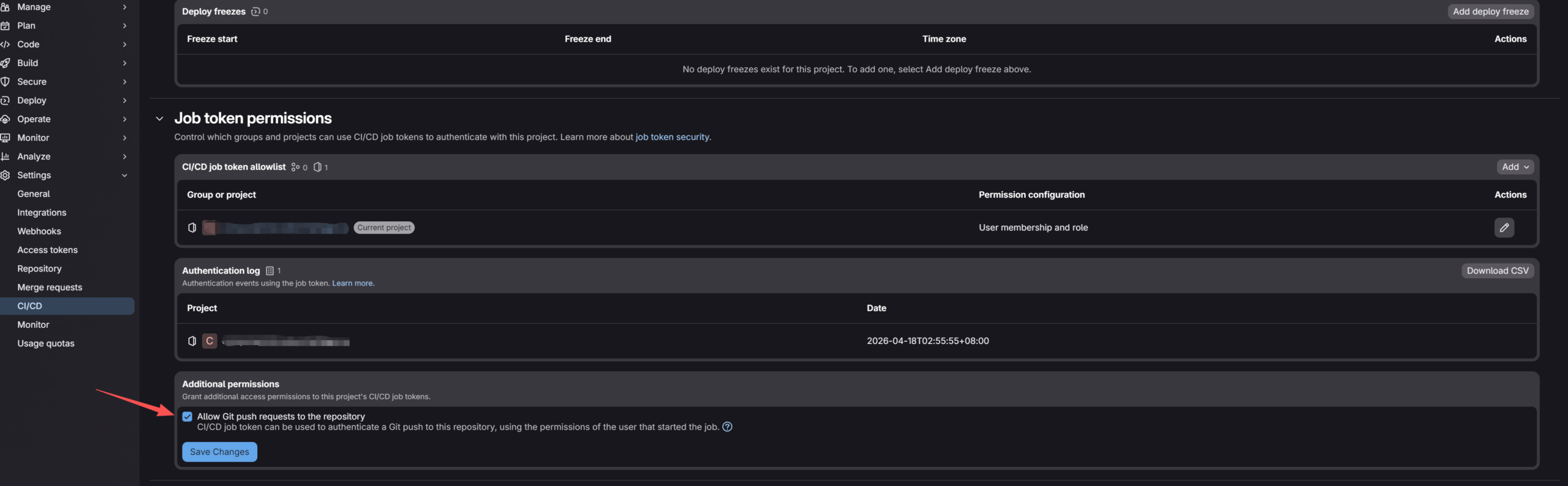
此时再次启动该项目的流水线 mirror_code_intelligence, 就会得到和官方 code-intelligence components 组件项目完全一致的项目页。
大概是最后一步: 改写项目中的 .gitlab-ci.yml
不妨假设组件已被公开在了路径 https://<实例域名>/components/code-intelligence 下(组件项目 URL 以 https://gitlab.example.com/components/code-intelligence 为例, 使用组件的目标项目假定为一个基于 Javascript 的 Electron 项目 ci_projrct/example_project), 请结合以下这个包含 Python、TypeScript 和 C# 的 CI 配置模板。只需将此模板中的配置项按需添加到你项目根目录的 .gitlab-ci.yml 中即可:
stages:
  - test   # 确保存在 test 阶段,因为组件默认运行在此阶段

include:
  # ==========================================
  # 1. Python 代码智能配置
  # ==========================================
  - component: '${CI_SERVER_FQDN}/components/code-intelligence/python-code-intel@v0.0.4' # 注意替换为所需的版本号
    inputs:
      python_version: '3.10'       # 修改为你的项目 Python 版本 (如 3.8, 3.9, 3.11)
      node_version: '20'           # scip-python 依赖 Node.js,可以用 18、20 或者 latest
      # project_relative_path: ''  # 如果代码不在仓库根目录,请填相对路径

  # ==========================================
  # 2. TypeScript / JavaScript 代码智能配置
  # ==========================================
  - component: '${CI_SERVER_FQDN}/components/code-intelligence/typescript-code-intel@v0.0.4'
    inputs:
      language: 'javascript'       # 如果是 TS 项目,改为 'typescript'
      node_version: 'latest'       # 使用的 Node 版本, 可以是 20 或者 latest
      # project_relative_path: ''

  # ==========================================
  # 3. C# (.NET) 代码智能配置
  # ==========================================
  - component: '${CI_SERVER_FQDN}/components/code-intelligence/dotnet-code-intel@v0.0.4'
    inputs:
      dotnet_version: '7.0'        # 修改为项目的 .NET 版本 (如 6.0, 7.0, 8.0)
      # project_relative_path: ''
Code language: YAML (yaml)
如果你的 Python 代码在 backend/,TS 代码在 frontend/, 则需要分别指定 project_relative_path:
- component: '.../python-code-intel@...'
  inputs:
    project_relative_path: 'backend'
- component: '.../typescript-code-intel@...'
  inputs:
    project_relative_path: 'frontend'Code language: YAML (yaml)
此时再触发流水线, 则可能得到这么个报错结果:
$ if [[ typescript == "typescript" ]]; then # collapsed multi-line command
npm warn Unknown project config "electron_mirror". This will stop working in the next major version of npm. See `npm help npmrc` for supported config options.
npm warn Unknown project config "node_gyp_dist_mirror". This will stop working in the next major version of npm. See `npm help npmrc` for supported config options.
npm warn deprecated rimraf@2.6.3: Rimraf versions prior to v4 are no longer supported
npm warn deprecated inflight@1.0.6: This module is not supported, and leaks memory. Do not use it. Check out lru-cache if you want a good and tested way to coalesce async requests by a key value, which is much more comprehensive and powerful.
npm warn deprecated glob@7.2.3: Glob versions prior to v9 are no longer supported
npm warn deprecated boolean@3.2.0: Package no longer supported. Contact Support at https://www.npmjs.com/support for more info.
npm warn deprecated glob@10.5.0: Old versions of glob are not supported, and contain widely publicized security vulnerabilities, which have been fixed in the current version. Please update. Support for old versions may be purchased (at exorbitant rates) by contacting i@izs.me
npm warn deprecated glob@10.5.0: Old versions of glob are not supported, and contain widely publicized security vulnerabilities, which have been fixed in the current version. Please update. Support for old versions may be purchased (at exorbitant rates) by contacting i@izs.me
npm warn deprecated glob@10.5.0: Old versions of glob are not supported, and contain widely publicized security vulnerabilities, which have been fixed in the current version. Please update. Support for old versions may be purchased (at exorbitant rates) by contacting i@izs.me
added 637 packages in 12m
101 packages are looking for funding
  run `npm fund` for details
- /builds/ci_projrct/example_project (missing tsconfig.json)
error: no files got indexed. To fix this problem, make sure that the TypeScript projects ["/builds/ci_projrct/example_project"] contain input files or reference other projects.
Uploading artifacts for failed job
Uploading artifacts...
WARNING: dump.lsif: no matching files. Ensure that the artifact path is relative to the working directory (/builds/ci_projrct/example_project)
ERROR: No files to upload
Cleaning up project directory and file based variables
ERROR: Job failed: exit code 1
Code language: Bash (bash)
这是因为 scip-typescript 直接调用 TypeScript Compiler API 来解析模块依赖并生成抽象语法树(AST), 而这需要 tsconfig.json 文件来指定编译项目所需的源码目录及编译选项。CI 文件传入的 language: 'javascript', 也只是告诉 GitLab CI 组件跳过 TS 类型检查步骤, 索引器本身仍需这个 Compiler Host 配置才能工作。 因此 scip-typescript 才会报错说”missing tsconfig.json“和 “make sure that the TypeScript projects [“/builds/ci_projrct/example_project”] contain input files or reference other projects.“, 即它在当前目录找不到 tsconfig.json 或 jsconfig.json , 甚至未匹配到任何源码。这时它就会直接转身退出, 这种缺少 tsconfig.json 的情况在纯 JS 的 Electron 项目中较为常见, 解决方法也很简单——把它加上就行。
一种方式是在项目中生成:
npx tsc --initCode language: Bash (bash), 而另一种方式则是直接添加这份配置, 不过得手动修改一些内容, 具体配置方式和含义请参考 TypeScript 文档 tsconfig.json 是什么:
# tsconfig.json
{
    "compilerOptions": {
        "target": "ES2020",
        "module": "ESNext",
        "moduleResolution": "node",
        "allowJs": true, // 允许索引 .js 文件
        "checkJs": false, // 关闭类型检查,防止非 TS 语法阻断索引
        "skipLibCheck": true, // 跳过 node_modules 类型检查,大幅提速
        "esModuleInterop": true,
        "resolveJsonModule": true,
        "noEmit": true // 仅索引,不输出编译产物
    },
    "include": [
        "src/**/*",
        "main/**/*", // Electron 主进程常见目录
        "renderer/**/*", // Electron 渲染进程常见目录
        "config/**/*",
        "**/*.js",
        "**/*.jsx",
        "**/*.mjs",
        "**/*.cjs"
    ],
    "exclude": [
        "node_modules",
        "dist",
        "build",
        "out",
        ".git",
        "**/*.test.js"
    ]
}
Code language: JSON / JSON with Comments (json)
别忘了将镜像来的项目声明为组件项目
在放行 main 分支的强制推送并将组件库引入项目流水线后, 我们会发现仅仅把代码镜像到 GitLab 中是不够的。因为还需确保这个镜像项目被标记为组件项目, 否则其他项目无法将该项目作为组件使用, GitLab 只会报错说 [流水线无效, 因为找不到组件]。声明为组件项目的具体做法很简单:
- 找到组件项目:
components/code-intelligence - 进入 Settings > General, 展开 Visibility, project features and permissions
- 找到最下方的 CI/CD Catalog Project 选项并将其启用
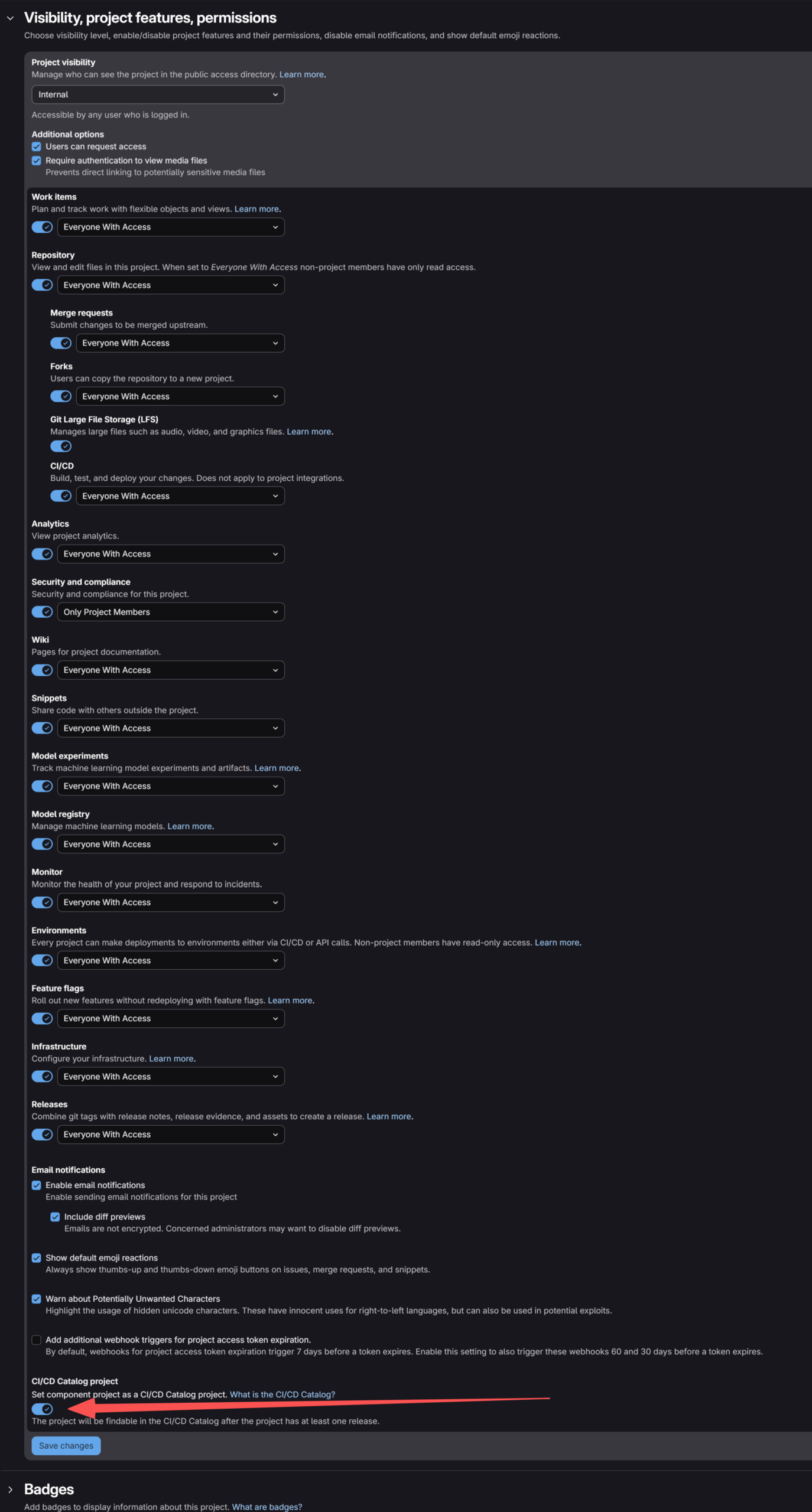
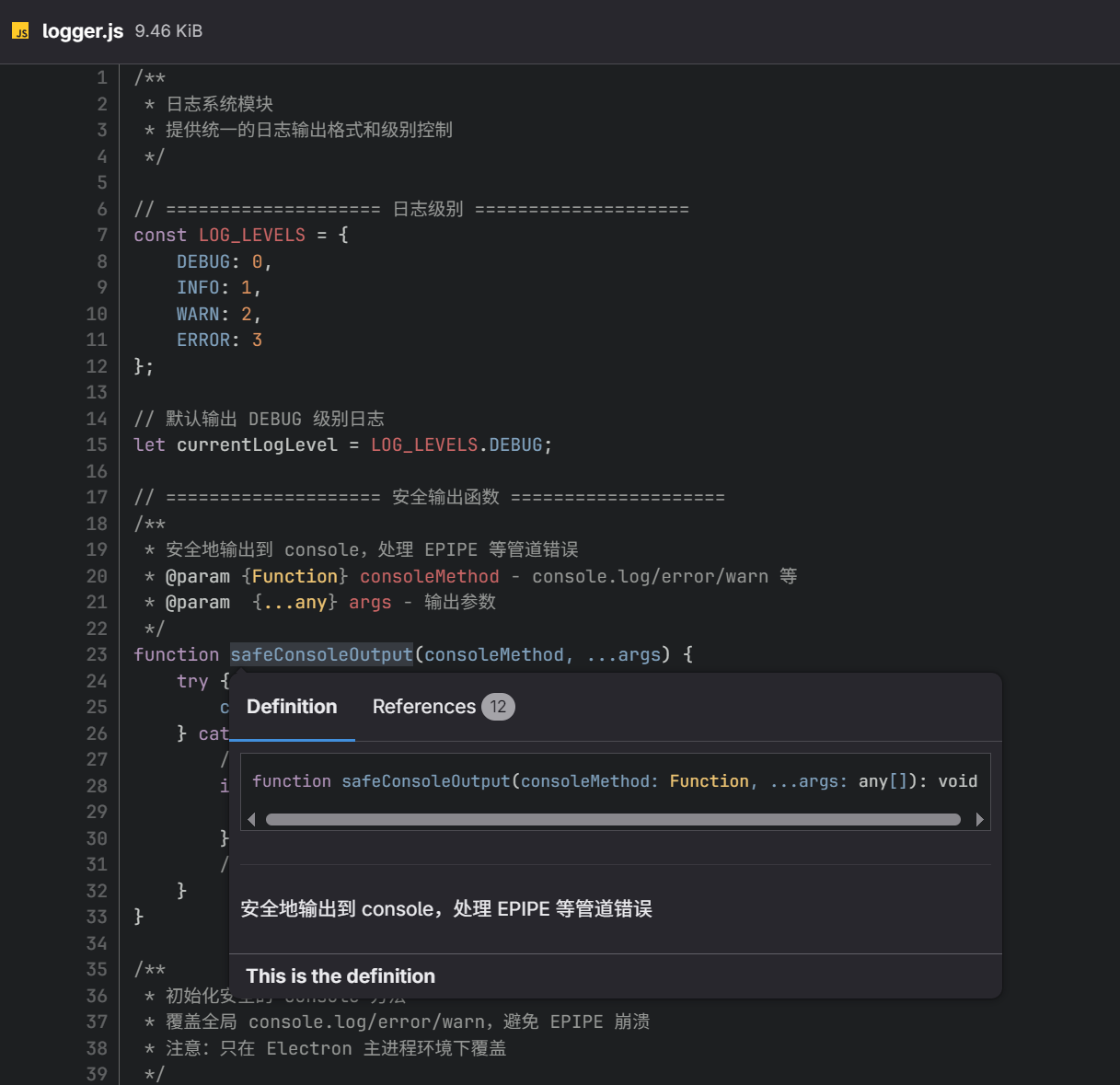
TADA~, 此时再触发项目流水线, 会看到 CI Runner 成功上传了 SCIP 索引器生成的 LSIF 索引, 并被 GitLab 识别:
全部搞定了……吗? 这事儿没完
不妨回忆一下”用 Gitlab CI/CD 来镜像官方组件库”那一节的做法, CI 组件项目中的 .gitlab-ci.yml 是这么进行推送的:
#.gitlab-ci.yml
mirror_code_intelligence:
  image: alpine:latest
  stage: deploy
  before_script:
    - apk add --no-cache git bash
  script:
    - git clone --mirror $SOURCE_URL ./mirror-repo
    - cd ./mirror-repo
    - git remote set-url --push origin "https://gitlab-ci-token:${CI_JOB_TOKEN}@${CI_SERVER_FQDN}/${CI_PROJECT_PATH}.git"
    - git push --mirror origin
  rules:
    - if: '$CI_PIPELINE_SOURCE == "schedule"'
Code language: YAML (yaml)
只能说 Force Push 一时爽, 流水线配置火葬场。这个流水线一旦成功运行, 流水线配置 .gitlab-ci.yml 就会被破坏, 或者说会被替换为官方 code-intelligence components 项目中的 .gitlab-ci.yml。这使得最开始希望定时同步官方仓库的企图完全破灭, 因为连 mirror_code_intelligence 任务本身都消失了, 定时执行无从谈起。这种一次性同步的做法, 反倒还不如用 git clone 官方项目到本地 PC, 再从本地 PC 推送到 GitLab 的组件仓库来得直接方便, 使用流水线的意义荡然无存, 自动同步远端项目的动机也未能实现。
那么该怎么办呢? 专用的远端同步项目
此时很容易想到, 最佳解决方案是专门设立一个远端同步项目 components/repository-synchronization, 让该项目的 CI/CD 流水线为多个组件拉取远程仓库代码, 再分别推送到各组件项目中去。为实现该效果, 需要去 components 的群组设置中创建一个 Group access tokens(群组访问令牌), 确保 repository-synchronization 有权限向各组件项目推送代码, 具体来说便是让这个新增的令牌持有 write_repository 权限和 Maintainer 角色:
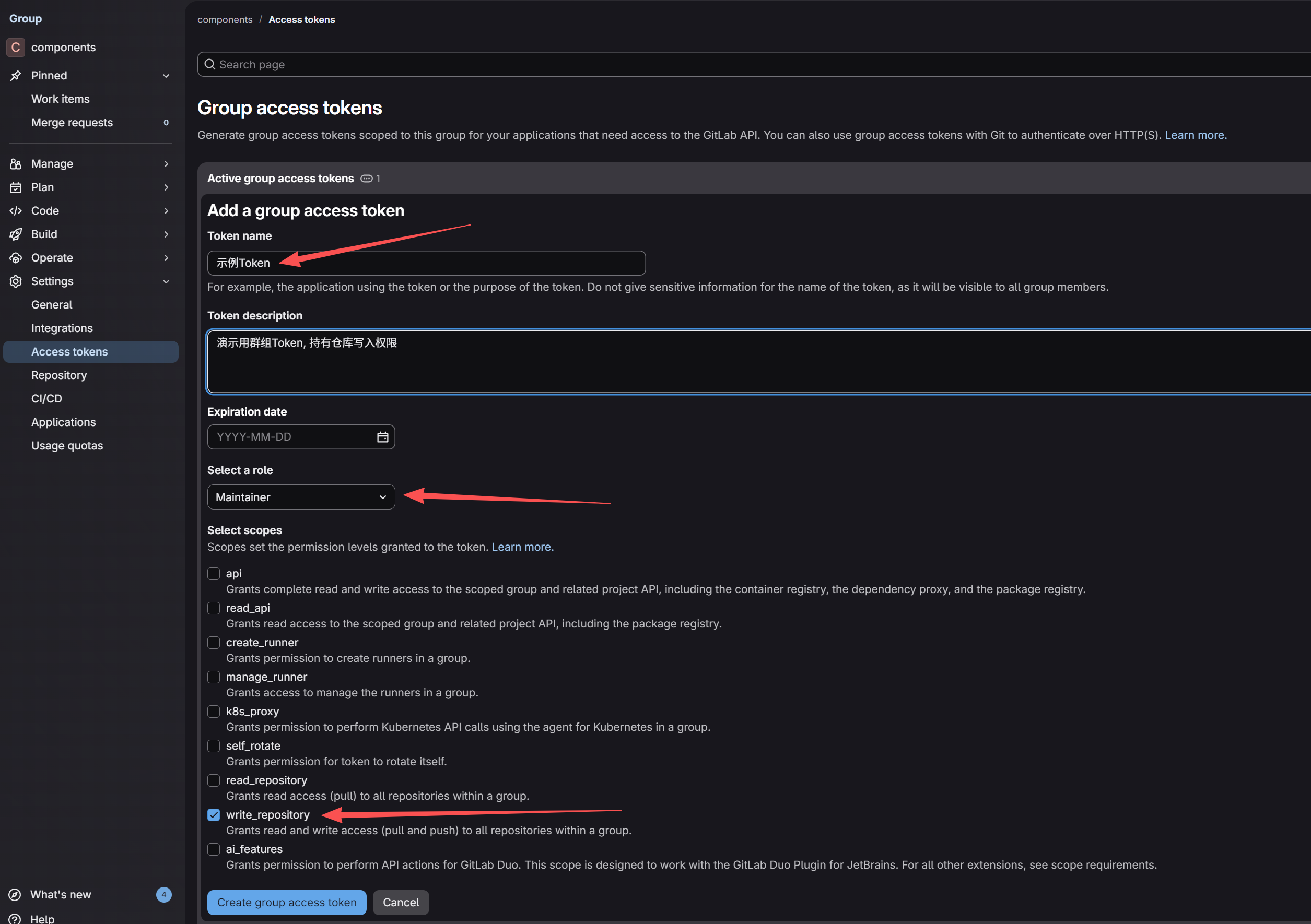
其次是在 components 下创建 repository-synchronization 项目, 并提交这份 .gitlab-ci.yml 配置:
stages:
  - sync

# 定义同步任务
mirror_sync:
  stage: sync
  image: alpine:latest
  before_script:
    - apk add --no-cache git bash
  script:
    # 1. 完整克隆源仓库
    - git clone --mirror "$SOURCE_URL" ./mirror-repo
    - cd ./mirror-repo

    # 2. 配置推送地址 (注入 Token)
    # 格式:https://oauth2:<TOKEN>@<HOST>/<PATH>.git
    - git remote set-url --push origin "https://oauth2:${SYNC_TOKEN}@${CI_SERVER_FQDN}/${TARGET_PATH}.git"

    # 源仓库的 refs/merge-requests 和 refs/pipelines 不应推送自建 GitLab
    # 3. 强制镜像推送
    # - git push --mirror origin

    # 3. 分别推送分支、标签和 Notes
    # refs/heads/*
    - git config remote.origin.mirror false
    - git push --force --all origin
    # refs/tags/*
    - git push --force --tags origin
    # refs/notes/*
    - git push origin 'refs/notes/*:refs/notes/*'

    # 4. 清理工作区
    - cd .. && rm -rf ./mirror-repo
  rules:
    - if: '$CI_PIPELINE_SOURCE == "schedule"'

  # 定义矩阵,每个对象生成一个独立的 Job
  parallel:
    matrix:
      # 代码导航
      - SOURCE_URL: "https://gitlab.com/components/code-intelligence.git"
        TARGET_PATH: "components/code-intelligence"

      # Secret 扫描
      - SOURCE_URL: "https://gitlab.com/components/secret-detection"
        TARGET_PATH: "components/secret-detection"

      # 代码质量
      - SOURCE_URL: "https://gitlab.com/components/code-quality-oss/codequality-os-scanners-integration"
        TARGET_PATH: "components/code-quality-oss"

      # SAST
      - SOURCE_URL: "https://gitlab.com/components/sast"
        TARGET_PATH: "components/sast"
Code language: YAML (yaml)
这份配置定义了一个仅在 sync 阶段执行的并行作业 mirror_sync, 流水线仅支持定时计划任务触发。同时使用 parallel 关键字定义了并行作业, 它会根据 matrix 中的各个项创建多个并行作业, 以便并行地同步各 SOURCE_URL 中的远程组件仓库, 将他们分别推送到对应的 TARGET_PATH 中去, 如需添加更多组件或普通项目, 只需扩写 matrix 即可。要注意其中的 git push --mirror origin, 它会完整推送 GitLab.com 中的 hidden ref, 例如 GitLab.com 上的合并请求和流水线等数据, 这会被自建 GitLab 拒绝, 因此应分别推送其分支、标签和 Notes; 而 if: '$CI_PIPELINE_SOURCE == "schedule"' 这行则要求流水线仅通过定时计划任务触发, 避免手工劳动参与其中。
最后, 在 components/repository-synchronization 项目的 Build > Pipeline schedules > New schedule 中添加新的定时计划任务, 点击执行便能看到同步效果。
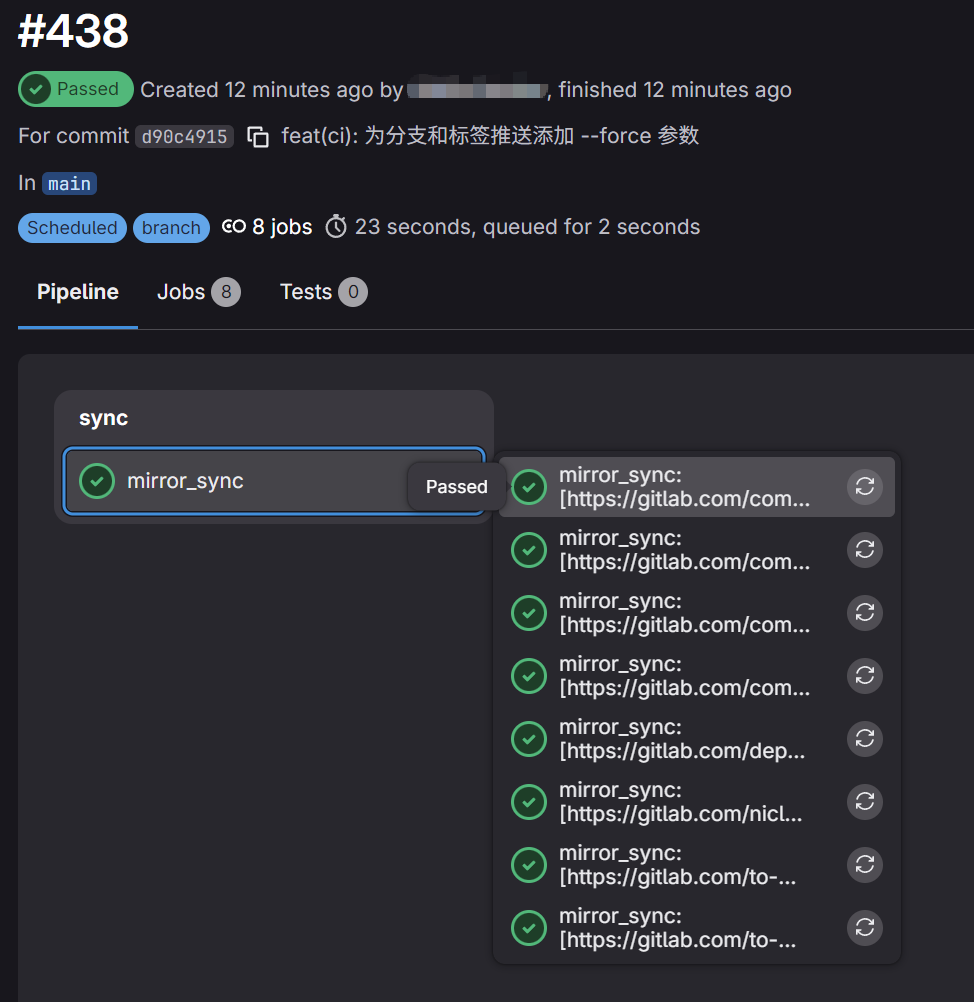
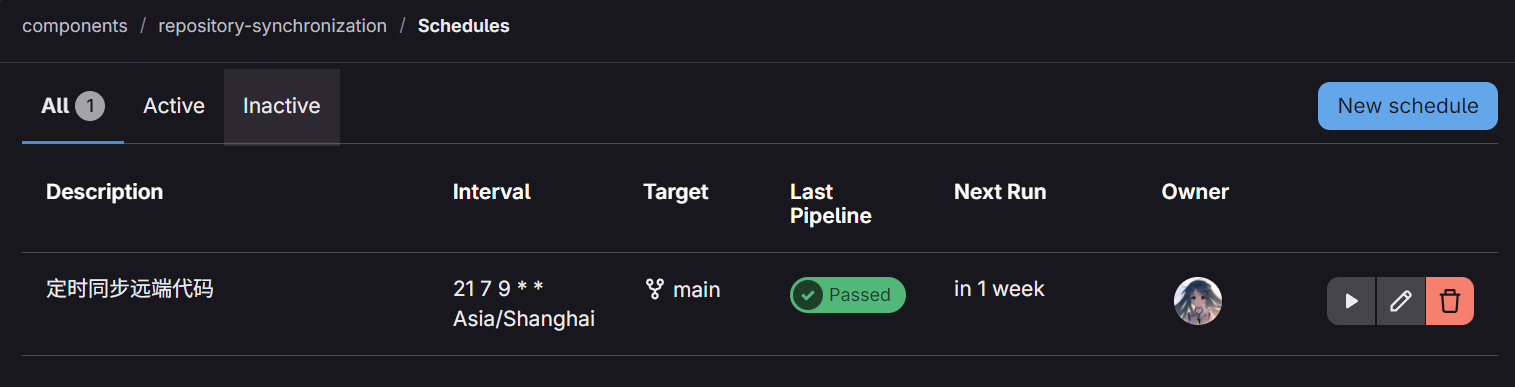
如此, 便能完美替代需要收费的 Mirroring repositories 功能, 保持一个不受外部影响的独立同步项目, 并能定时地统一同步多个远程组件项目。
全文完
参考资料
- Code Intelligence – GitLab Docs
- code-intelligence components – GitLab
- Pull from a remote repository -GitLab Docs
- LSIF – Language Server Index Format
- SCIP Code Intelligence Protocol
- SCIP Code Intelligence Protocol – GitHub
- The future of SCIP – Sourcegraph Blog
- scip-typescript: a new TypeScript and JavaScript indexer
- scip-python – GitHub
- scip-dotnet – GitHub
- Sourcegraph – GitLab Docs
- Provide native support for SCIP indexes for use with Code Intelligence – GitLab Issue
- Index a TypeScript or JavaScript repository – Sourcegraph
- GitLab全局搜索之SourceGraph – 现代伪诗人陆游
- 使用sourcegraph实现高效全局代码仓库搜索 – 吾八哥博客
- CI/CD Catalog – GitLab Docs
- CI/CD components – GitLab Docs
- Use a GitLab.com component on GitLab Self-Managed – GitLab Docs
- tsconfig.json 是什么 – TypeScript
- Reuse CI Job 的新方法: GitLab CI/CD Components – 艦長,你有事嗎?
- 為什麼你應該改用 GitLab CI/CD Components? – 艦長,你有事嗎?
- 將你的 CI/CD Components 公開發佈至 GitLab CI/CD Catalog – 艦長,你有事嗎?
